Render Props vs Custom Hooks: When the Old Pattern Still Wins
Custom hooks replaced render props for most cases — but not all. Learn the four scenarios where the old pattern still wins, with TypeScript examples.
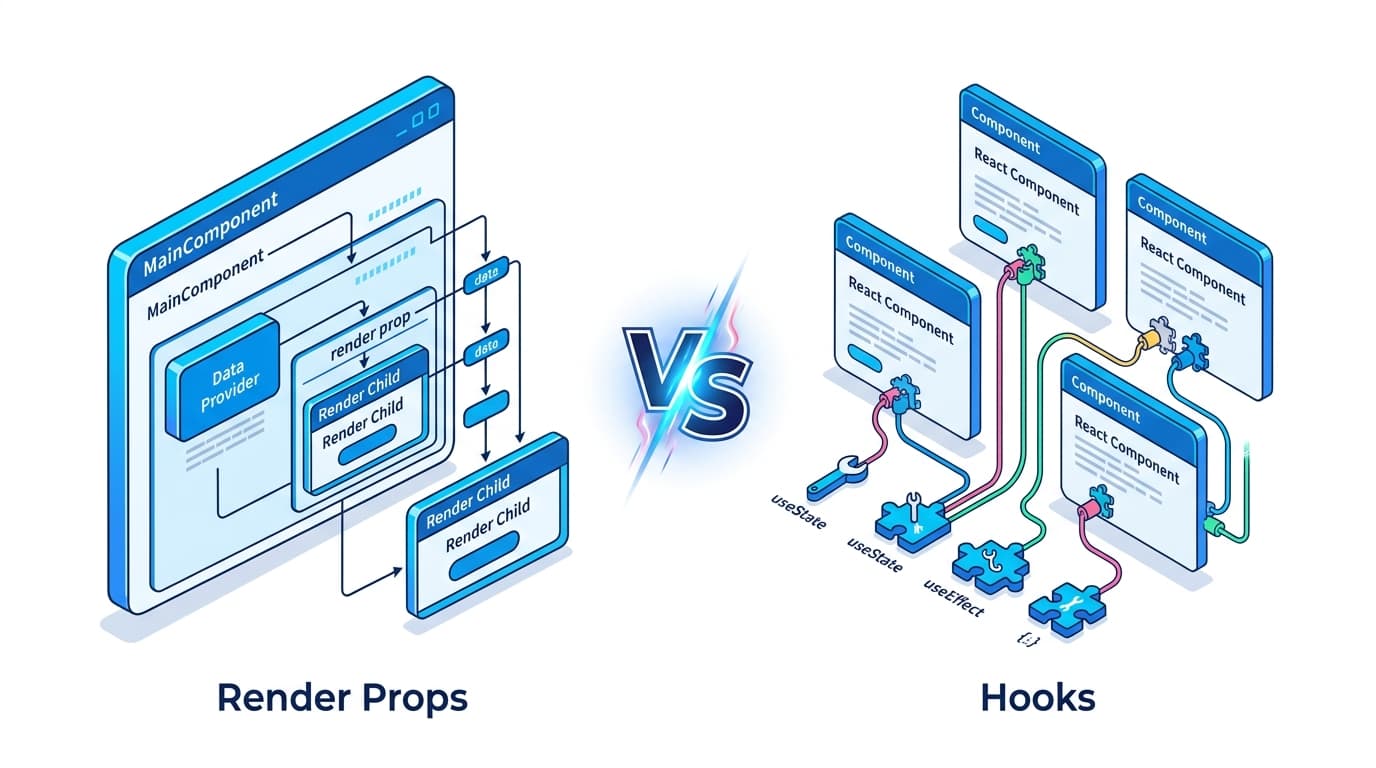
Render Props vs Custom Hooks: When the Old Pattern Still Wins
You're reviewing a PR and someone on the team has reached for a render prop. First instinct: "shouldn't that be a hook?" Sometimes yes. But sometimes that instinct is wrong, and understanding exactly when will sharpen your architectural decisions considerably.
Custom hooks have rightfully become the default for sharing stateful logic in React. They're composable, readable, and don't nest your JSX into a pyramid of doom. But render props aren't dead — they solve a different class of problems, and a handful of real-world scenarios still demand them. This guide walks through both patterns with the same examples so you can make the call deliberately instead of reflexively.
The Problem
Before hooks existed, render props were the standard way to share logic between components. Here's a classic mouse-tracking example that many of us wrote:
// The classic render props implementation
interface MousePosition {
  x: number;
  y: number;
}

interface MouseTrackerProps {
  render: (position: MousePosition) => React.ReactNode;
}

class MouseTracker extends React.Component<MouseTrackerProps, MousePosition> {
  state = { x: 0, y: 0 };

  handleMouseMove = (e: React.MouseEvent) => {
    this.setState({ x: e.clientX, y: e.clientY });
  };

  render() {
    return (
      <div onMouseMove={this.handleMouseMove}>
        {this.props.render(this.state)}
      </div>
    );
  }
}

// Usage — nesting compounds fast
function Dashboard() {
  return (
    <MouseTracker
      render={({ x, y }) => (
        <AuthConsumer
          render={({ user }) => (
            <ThemeConsumer
              render={({ theme }) => (
                <div style={{ color: theme.primary }}>
                  {user.name} is at {x}, {y}
                </div>
              )}
            />
          )}
        />
      )}
    />
  );
}
This breaks down fast. Three levels of render props and you're already fighting indentation. Every render prop is an inline function, which means a new function reference on every render — breaking React.memo and PureComponent optimizations silently. And it's notoriously hard to read during code review.
This is exactly the scenario hooks were designed to fix. But not all scenarios look like this one.
The Pattern: Custom Hook (The Modern Default)
For sharing stateful logic that doesn't need to control rendering, a custom hook is almost always the better choice.
// useMousePosition.ts
import { useState, useEffect } from "react";

interface MousePosition {
  x: number;
  y: number;
}

export function useMousePosition(): MousePosition {
  const [position, setPosition] = useState<MousePosition>({ x: 0, y: 0 });

  useEffect(() => {
    const handler = (e: MouseEvent) => {
      setPosition({ x: e.clientX, y: e.clientY });
    };
    window.addEventListener("mousemove", handler);
    return () => window.removeEventListener("mousemove", handler);
  }, []);

  return position;
}
// Dashboard.tsx — dead simple, no nesting
import { useMousePosition } from "@/hooks/useMousePosition";
import { useAuth } from "@/hooks/useAuth";
import { useTheme } from "@/hooks/useTheme";
function Dashboard() {
const { x, y } = useMousePosition();
const { user } = useAuth();
const { theme } = useTheme();
return (
<div style={{ color: theme.primary }}>
{user.name} is at {x}, {y}
</div>
);
}Key decisions here:
- Flat composition: Three pieces of logic, three hook calls, zero nesting. This is the fundamental win hooks give you.
- No JSX constraints: The hook returns data.
Dashboarddecides exactly how to render it. There's no implicit wrapper element you didn't ask for. - Stable references: Hook-returned callbacks and values can be memoized at the hook level, so
Dashboardcan safely pass them to memoized children.
How It Flows
The hook pattern stays flat. The render prop pattern nests. This is why hooks won for most use cases.
Where Render Props Still Win
Here's where most articles stop — and where the real insight starts. There are four scenarios where render props are genuinely the better choice, even today.
1. Error Boundaries
React error boundaries must be class components — getDerivedStateFromError is what makes a component a boundary, with componentDidCatch optional for logging. There is still no hook equivalent; this is a hard technical limitation, not a style preference. The render prop pattern gives you a clean escape hatch:
// ErrorBoundary.tsx — must be a class component
interface ErrorBoundaryProps {
  fallback: (error: Error, reset: () => void) => React.ReactNode;
  children: React.ReactNode;
}

interface ErrorBoundaryState {
  error: Error | null;
}

class ErrorBoundary extends React.Component<
  ErrorBoundaryProps,
  ErrorBoundaryState
> {
  state: ErrorBoundaryState = { error: null };

  static getDerivedStateFromError(error: Error): ErrorBoundaryState {
    return { error };
  }

  componentDidCatch(error: Error, info: React.ErrorInfo) {
    console.error("Caught error:", error, info);
  }

  reset = () => this.setState({ error: null });

  render() {
    if (this.state.error) {
      // <-- render prop: the consumer controls the fallback UI
      return this.props.fallback(this.state.error, this.reset);
    }
    return this.props.children;
  }
}

// Usage — the consumer owns the fallback rendering
function PaymentForm() {
  return (
    <ErrorBoundary
      fallback={(error, reset) => (
        <div className="error-card">
          <p>Payment failed: {error.message}</p>
          <button onClick={reset}>Try again</button>
        </div>
      )}
    >
      <StripeCheckout />
    </ErrorBoundary>
  );
}
You can't replace this with a hook. useErrorBoundary() doesn't exist in React's model. The react-error-boundary package on npm — a third-party library, not a React team project — exposes this same shape as fallbackRender.
React 19 adds one thing that is adjacent but not a substitute: createRoot(node, { onCaughtError, onUncaughtError }). Those fire for errors a boundary caught and for errors nothing caught, which is the right place to wire error reporting once. They don't render a fallback, so you still need the class.
2. Scoped Re-render Isolation
This is the subtle one. When a hook changes state, the entire component that called it re-renders. When a render prop changes state, only the subtree the render prop controls re-renders.
// Expensive parent component that renders a large list
function ProductCatalog({ products }: { products: Product[] }) {
  // If we used useMouseTooltip() here, every mouse move would
  // re-render the ENTIRE ProductCatalog including the 500-item list.

  return (
    <div>
      <h1>All Products</h1>
      <HeavyProductList products={products} /> {/* expensive — 500 items */}

      {/* Render prop: tooltip state is scoped to this subtree only */}
      <MouseTooltip
        render={({ x, y, isVisible }) =>
          isVisible ? (
            <Tooltip style={{ left: x, top: y }}>
              Drag to compare products
            </Tooltip>
          ) : null
        }
      />
    </div>
  );
}
With a hook, ProductCatalog re-renders on every mouse move — which re-renders HeavyProductList. With the render prop, only the Tooltip subtree re-renders.
Render-counted on React 19.2.3 across two simulated mouse moves:
| Setup | ProductCatalog renders | HeavyProductList renders |
|---|---|---|
Render prop, state inside MouseTooltip | 1 | 1 |
useMouse() in ProductCatalog | 3 | 3 |
useMouse() + React.memo(HeavyProductList) | 3 | 1 |
So the isolation claim holds — but be honest about the third row. React.memo on the expensive child buys you the same protection where it matters, at the cost of one wrapper instead of a whole inverted API. The render prop's real advantage is that the state never enters the parent's scope at all, so nobody can accidentally read it there and reintroduce the coupling. Reach for it when the state is genuinely none of the parent's business; reach for memo when it's just an expensive sibling.
3. Headless Component Libraries (Inversion of Control)
Libraries like Downshift (combobox/autocomplete), react-table (pre-v8), and older Formik use render props because they need to hand full rendering control to the consumer. The library owns the behavior; the consumer owns the markup.
// A headless Dropdown — the library manages keyboard navigation,
// ARIA attributes, and open/close state. You control the HTML.
interface DropdownRenderProps {
  isOpen: boolean;
  toggle: () => void;
  getItemProps: (item: string) => React.HTMLAttributes<HTMLLIElement>;
  getToggleProps: () => React.HTMLAttributes<HTMLButtonElement>;
  highlightedIndex: number;
}

interface DropdownProps {
  items: string[];
  onSelect: (item: string) => void;
  children: (props: DropdownRenderProps) => React.ReactNode; // children-as-function
}

function Dropdown({ items, onSelect, children }: DropdownProps) {
  const [isOpen, setIsOpen] = useState(false);
  const [highlightedIndex, setHighlightedIndex] = useState(-1);

  // ... keyboard navigation logic, ARIA management, etc.

  return (
    <>
      {children({
        isOpen,
        toggle: () => setIsOpen((o) => !o),
        highlightedIndex,
        getToggleProps: () => ({
          "aria-haspopup": "listbox",
          "aria-expanded": isOpen,
          onClick: () => setIsOpen((o) => !o),
        }),
        getItemProps: (item) => ({
          role: "option",
          "aria-selected": false,
          onClick: () => onSelect(item),
          onMouseEnter: () => setHighlightedIndex(items.indexOf(item)),
        }),
      })}
    </>
  );
}

// Consumer: full control over the rendered HTML structure
function CitySelector() {
  const cities = ["New York", "London", "Tokyo"];

  return (
    <Dropdown items={cities} onSelect={(city) => console.log(city)}>
      {({ isOpen, getToggleProps, getItemProps, highlightedIndex }) => (
        <div className="custom-select">
          <button {...getToggleProps()}>Select a city</button>
          {isOpen && (
            <ul role="listbox">
              {cities.map((city, i) => (
                <li
                  key={city}
                  className={i === highlightedIndex ? "highlighted" : ""}
                  {...getItemProps(city)}
                >
                  {city}
                </li>
              ))}
            </ul>
          )}
        </div>
      )}
    </Dropdown>
  );
}
You could expose this as useDropdown() — and that's often the better API. But when the library needs to be a first-class React element (to participate in the component tree, inject context, or wrap children in a specific DOM node), the render prop is the right shape.
4. When the Abstraction Has to Be an Element
A hook returns values into whoever called it. It cannot wrap anything. So anything that needs to be in the tree — inject a Provider around its children, mount a portal, sit inside a <Suspense> boundary — has to be a component, and a render prop is how it hands data back:
// Manages the fetch AND owns a slot in the tree, so it can wrap children
// (in a Provider, an ErrorBoundary, a portal — whatever it needs).
function DataFetcher<T>({
  url,
  children,
}: {
  url: string;
  children: (data: T | null, loading: boolean, error: Error | null) => React.ReactNode;
}) {
  const [data, setData] = useState<T | null>(null);
  const [loading, setLoading] = useState(true);
  const [error, setError] = useState<Error | null>(null);

  useEffect(() => {
    const controller = new AbortController();
    setLoading(true);
    setError(null);
    setData(null); // don't show the previous url's data under the new one
    fetch(url, { signal: controller.signal })
      .then((res) => res.json())
      .then((d) => { setData(d); setLoading(false); })
      .catch((e) => {
        if (e.name === 'AbortError') return; // a newer url won the race
        setError(e);
        setLoading(false);
      });
    return () => controller.abort();
  }, [url]);

  return <>{children(data, loading, error)}</>;
}

// Usage
function OrdersPage() {
  return (
    <DataFetcher<Order[]> url="/api/orders">
      {(orders, loading, error) => {
        if (loading) return <Spinner />;
        if (error) return <ErrorMessage error={error} />;
        return <OrderList orders={orders!} />;
      }}
    </DataFetcher>
  );
}
Variations and Edge Cases
Avoiding the Inline Function Trap
The biggest performance gotcha with render props: inline functions create a new reference every render, breaking React.memo on the wrapping component.
// BAD — new function on every OrdersPage render
function OrdersPage() {
  return (
    <MouseTracker render={(pos) => <Cursor x={pos.x} y={pos.y} />} />
  );
}

// GOOD — stable reference with useCallback
function OrdersPage() {
  const renderCursor = useCallback(
    (pos: MousePosition) => <Cursor x={pos.x} y={pos.y} />,
    [] // no dependencies = stable reference
  );

  return <MouseTracker render={renderCursor} />;
}
Only matters if MouseTracker is wrapped in React.memo or extends PureComponent. In function components without memoization, the re-render happens anyway, so the inline function costs nothing extra.
Children-as-Function (Same Pattern, Cleaner API)
Using children instead of a named render prop reads more naturally at the call site:
// Prop named "render"
<DataFetcher url="/api/orders" render={(data) => <OrderList orders={data} />} />

// Children as function — reads like normal JSX nesting
<DataFetcher url="/api/orders">
  {(data) => <OrderList orders={data} />}
</DataFetcher>
Both are render props. The children version is the more common convention today.
Hybrid: Export Both Hook and Component
Many mature libraries expose both APIs. The hook is for simple cases; the component is for when you need it in JSX:
// Hook version — for most cases
const { data, loading } = useOrders("/api/orders");

// Component version — for when you need it as a JSX element
<OrdersLoader url="/api/orders">
  {({ data, loading }) => <OrderList orders={data} />}
</OrdersLoader>
The component internally calls the hook. Zero logic duplication, two surfaces.
When NOT to Use Render Props
Don't reach for a render prop when you just need to share stateful logic between components. That's exactly what custom hooks are for, and hooks will be cleaner every single time.
Specifically, skip render props when:
- You're only sharing data or behavior — hooks compose better, are easier to test, and produce no extra JSX nodes.
- You have more than two pieces of shared logic — composing three hooks is three lines; composing three render props is a nesting nightmare.
- The team is junior-to-mid level — render props have a steeper learning curve. The "children as function" pattern surprises people who haven't seen it before.
- You're building internal app code — render props make the most sense as public API surfaces for libraries. For app-layer code, hooks almost always win on readability.
The decision rule I use: if the abstraction needs to render something or occupy a slot in the tree, it's a component (render prop). If it only needs to share logic and return values, it's a hook. Almost everything you meet in app code is the second kind.
Comments (0)
No comments yet. Be the first to share your thoughts!
Related Articles
![Do [1,4] and [4,5] Overlap? Answer That First](/_next/image?url=%2Fblog%2Fcovers%2Fmerge-intervals-insert-interval.png&w=1200&q=75)